For when the work is done but the post still needs to move
Arqe is a browser-based suite of motion templates and animated device mockups you tune with sliders and export.
Arqe is a browser-based creative suite for branded motion. You drop your images or video into one of nearly 200 motion templates, tune it with sliders and export, or put your screens on animated 3D device mockups. One All Access plan costs $29 a month, $19 billed yearly or $890 for life.
The project's finished, the images are good, and now it has to go on Instagram, a case study page or a pitch deck. A grid of stills reads as a grid of stills. Making them move properly usually means a night in After Effects, or a timeline tool where every bit of movement is yours to build.
Arqe is a browser-based creative suite for exactly that moment. Its main tool, Singles, is a library of nearly 200 motion templates: drop your images or video into one, tune it with sliders and export. Alongside it sit animated device mockups and a library of art-directed stock, all in one subscription.
What's in it
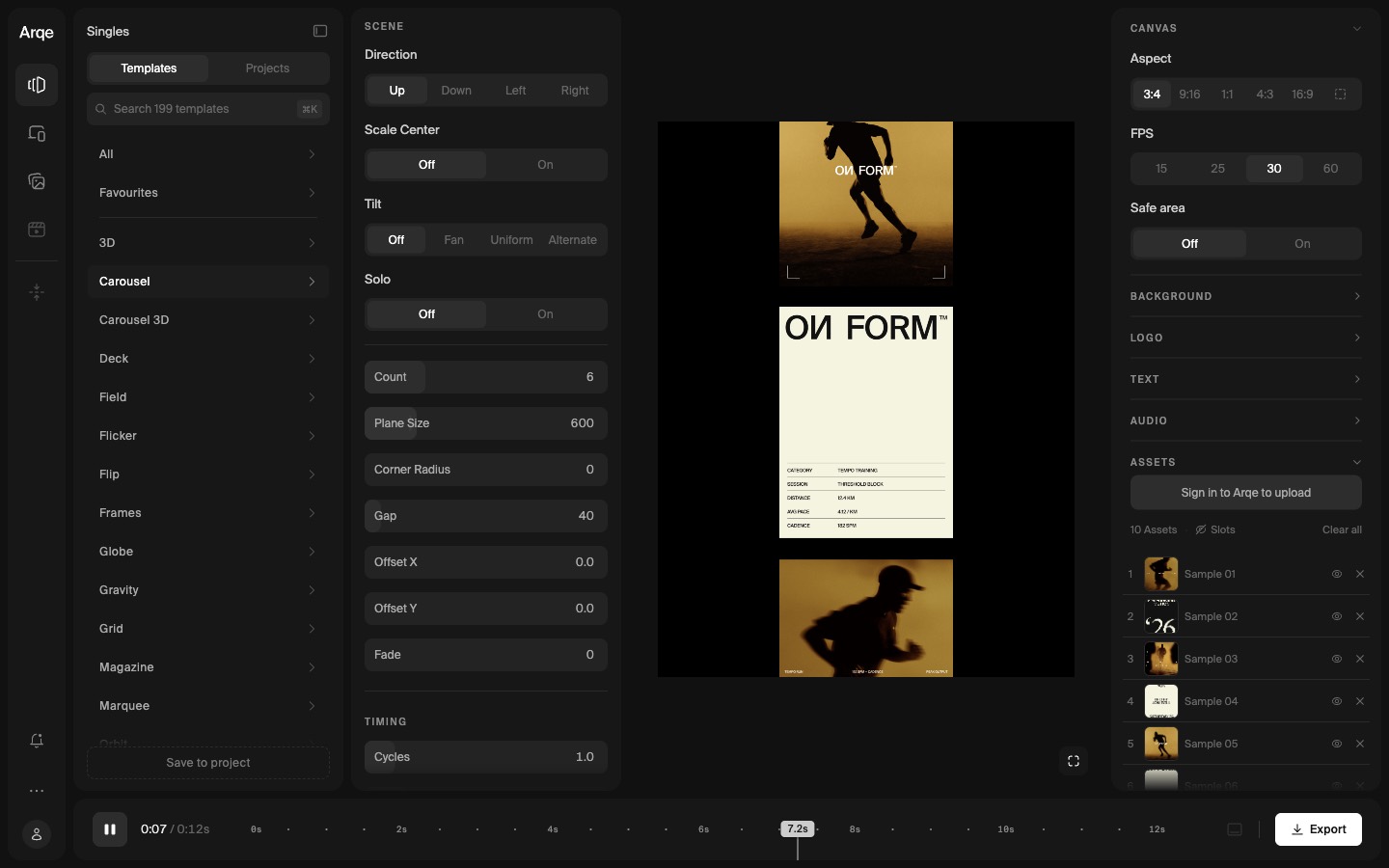
Singles is the core. The templates are grouped by the kind of movement, with names like Carousel, Globe, Orbit, Marquee, Parallax and Stack, and every one comes with sample images so you can see it moving before you add anything of your own. Each template exposes its own controls: how many planes, their size, corner radius, gap and offset, plus timing for duration, stagger and delay. Easing has presets (Flow, Glide, Snap, Settle and a long list of standard curves) or a custom curve. There are panels for background, logo, text and audio too.
Mockups puts your screenshots or screen recordings on a 3D device: iPhone 17 Pro, MacBook Pro 14", iPad Pro, Pro Display XDR or a universal screen, with real finishes or a custom color. You pose the device, set a couple of keyframes and the movement fills in between. Several shots can be cut together into one clip.
Stock is a library of AI-generated images in 4K, art directed and royalty-free. Reels and Compress are listed as coming soon.
How to use it
Pick a template. Open a group on the left and the templates play as small previews. Click one and your images (or the samples) drop straight into it.
Tune it. Every slider updates the preview as you drag. Pull the gap out, round the corners, add more planes, then switch the canvas between 3:4, 9:16, 1:1, 4:3 and 16:9 (or a custom size) without rebuilding anything. Frame rate goes from 15 up to 60.
Put it on a device. Switch to Mockups, pick a device and a starting scene, then rotate it until the angle sits right. Your own design or recording goes on the screen.
When it looks right, Export renders the video in the cloud, so nothing heavy happens on your machine.
Pricing
One plan, called All Access, covers everything: $29 a month, $19 a month billed yearly, or $890 once for lifetime access (marked as limited seats). It includes unlimited exports, saving your own custom templates and commercial usage rights.
You can try it first. The free preview lets you open every template and play with the demo images, but uploading your own files, saving projects and exporting need a subscription.
Heads up
The free preview is generous to look at but you can't take anything away from it, so judge it there before paying. And templates are templates: the speed comes from someone else having designed the movement. If you want to build motion from nothing, keyframe by keyframe, Jitter is the better fit, and it's in the index. Arqe is for when the movement is there to frame your work.
It runs in the browser on any device with nothing to install, though a laptop screen gives the controls room to breathe.
Who it's for
Designers and studios who show their work online and want it moving without learning motion design, and brand teams turning out a steady run of social posts and case study clips. Teams at Stripe and Norgram are listed among its users.
Open the demo, pick a group that suits your work and drag a few sliders. You'll know within a couple of minutes whether it fits how you post.
Written by Steve Salgado
About Arqe
- Tools
- Singles (motion templates), Mockups, Stock
- Price
- $29/month, $19/month yearly, $890 lifetime
- Formats
- 3:4, 9:16, 1:1, 4:3, 16:9 or custom; 15 to 60 fps
- Try it
- Free preview; uploads, saving and export need a plan
- Runs in
- The browser, nothing to install
You might also like